A real-time translation online manga reader
Manga translation, translate as you read
Two ways to use it: translate directly on manga sites, or drop single images and whole-volume ZIP/CBZ files into the web reader. Local OCR keeps your images on your device — 100 free pages on sign-up.
- Images never uploaded — recognized in your browser
- 100 free pages on sign-up, no card
- Works in Chrome / Edge / Kiwi
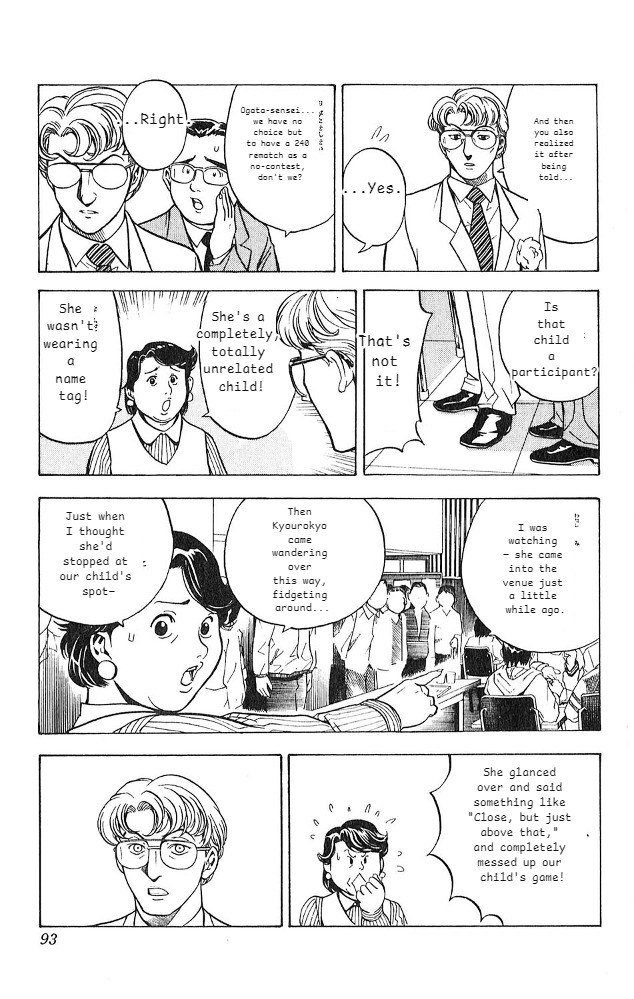
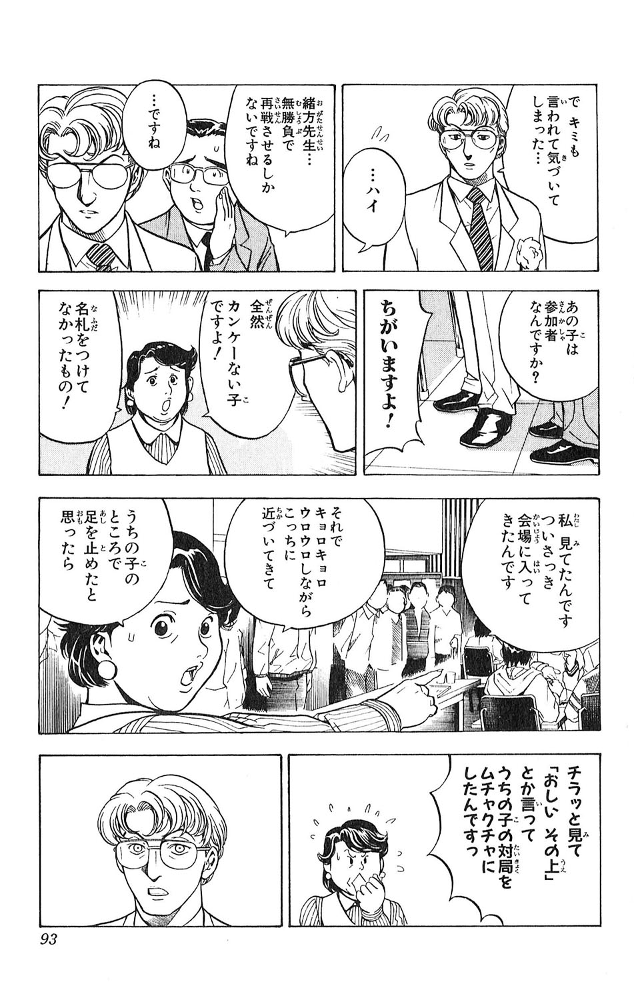
Drag the handle to compare before and after
Two ways to use it
Translate on the site you're already reading, or bring the files into the built-in web reader.
Translate on any manga site
Install the extension, open any manga site and right-click an image (or turn on auto-translate). The translation lands in the original bubbles — no downloads, no uploads, no imports.
Read in the web reader
Open the web reader and drop in single images or a whole-volume ZIP / CBZ. Archives are unpacked into pages and translated as you flip — archives can only be imported here.
Two paths, step by step
Left: translate on the site. Right: read your own files.
Translate on any manga site
- 01
Install the extension
One click from the Chrome Web Store — sign in and get 100 free pages.
- 02
Open a manga page
Read as usual on any manga site — the extension spots the large manga images for you.
- 03
Right-click, or let it auto-translate
Right-click an image and choose “Translate this image”, or turn on auto-translate and it follows your scroll. Translations sit in the original bubbles; switch back to the raw page anytime.
Read in the web reader
- 01
Open the reader
Sign in and open the web reader — nothing to install.
- 02
Drop in images or an archive
Single images, a batch, or a whole-volume ZIP / CBZ. Archives are unpacked and sorted by filename automatically.
- 03
Translate as you flip
Each page is recognized and translated when you turn to it, or hit “Translate this page”. Results are typeset over the original bubbles.
A smart manga reader built for translation
Smart translation, read at your pace.
Browser-local text recognition
A lightweight text recognition model runs in your browser — images never leave your device. Your manga stays private while you translate.
Automatic typesetting
Vertical and horizontal bubble-fit layout — the AI translation is rendered right back into the original speech bubbles. Automatic typesetting, no manual layout work.
In-place, never in the way
The translation replaces the text on the original image — it stays aligned while you scroll, flip or zoom. No giant overlay, no blocked navigation.
Viewport auto-translate
Translate what you scroll to. Thumbnails, ads and recommendation strips are skipped so pages aren't wasted.
Page-flip translation
Import multiple images, ZIP, or CBZ archives at once — every page is auto-translated as you flip. Smooth, like reading an e-book.
50 source languages
Japanese, English, Traditional Chinese and 46 Latin-script languages are recognized; translate into Chinese, English, Japanese and more.
Tested on these sites
Images, canvases, lazy loading, hotlink protection — all reader shapes handled.
- MangaDex
- WEBTOON
- Comikey
- MANGA Plus
- manga-park
- mangakakalot
- Tapas
Don't see your site? If the manga renders as <img> or <canvas>, it works.
A site isn't supported or doesn't work? Email us: [email protected]
Compared with screenshot translators
Skip the screenshot, paste and re-align busywork.
Moonlight plan
Sign up for 100 free pages — buy a page pack when you need more. Pages never expire.
Page pack - 3000 pages
One payment — no subscription, no auto-renewal
- 3000 pages, never expire
- Browser-local OCR, images never uploaded
- Stackable — buy another pack anytime
- Batch / whole-volume ZIP CBZ import & reading in the web reader
Frequently asked questions
Are my manga images uploaded to a server when I translate?+
No. The lightweight text recognition model runs entirely in your browser; images are never uploaded. Only the recognized text is sent to the translation service — your manga content stays fully private and is not stored after translation completes.
Which manga languages are supported?+
Recognition supports Simplified Chinese, Traditional Chinese, English, Japanese, and 46 Latin-script languages — 50 source languages in total. Translation supports multiple target languages. Korean is not supported. More target languages are being added.
Does the translation get rendered back onto the manga page automatically?+
Yes. Mangaluna is an automatic-typesetting manga translation reader — recognize, translate and typeset in one pass. Vertical and horizontal bubble-fit layout puts the translation back into the original speech-bubble position with no manual layout work. You can also turn translation off and read the original.
Can I import whole-volume ZIP or CBZ manga archives?+
Yes — this is a flagship feature. Just drag a ZIP or CBZ into the reader; Mangaluna unzips it, sorts pages by filename, and auto-translates as you flip. It feels like reading an e-book.
How accurate is the translation?+
Accuracy depends on source-image clarity, text size and layout complexity. Mangaluna uses an AI translation model with automatic typesetting — on clean scans or digital manga, dialogue and narration translate far better than traditional machine translation. Slang, puns, onomatopoeia and credit pages may still need human review. We recommend treating the translation as a reading aid, not a replacement for the original.
What payment methods are accepted?+
All payments are securely handled by Creem. Cards (Visa, Mastercard, Amex), PayPal, Apple Pay, Google Pay, and local payment methods based on customer location.
What's the difference between the extension and the web reader?+
The extension is for reading on manga sites: install it and right-click any manga page — no imports. The web reader is for your own files: drag in images or a whole-volume ZIP/CBZ and it translates as you flip. Archives can only be imported in the reader. Both share the same free pages and page packs.
Install it and read the next chapter
100 free pages on sign-up, no credit card. Top up with a page pack when you need more — pages never expire.